
An easy way to internet-enable your fax machine





FaxBridge overview
Organizations are consolidating voice, fax and data resources to cut costs and simplify their communications infrastructure. Voice over IP (VoIP) and Fax over IP (FoIP) are two technologies that have become critical to organizations as they create a unified strategy for voice and data communications. These technologies allow companies to reduce their total cost of ownership by eliminating telephony hardware and consolidating the management of voice, data and fax communications.
Fax machines can be located anywhere and used as secure fax terminals when connected to FaxBridge devices. FaxBridge devices auto provision and do not require any remote software configuration.
FaxBridge eliminates the need for POTS lines and requires only an internet connection and power source.
Fax ATAs & FaxBridge
A FaxBridge is a type of ATA (analog telephone adapter) used to connect your analog fax machine to your internet service. Without any need to maintain an analog phone line exclusively for your fax machines, a fax ATA saves you money. And with all your documents being sent over mFax’s secure Priority Delivery Network, you can rest assured your private documents are regulation-compliant and reliably delivered.
How fax ATAs work
Our FaxBridge ATA enhances your analog fax devices, allowing you to eliminate phone lines and send and receive faxes over just your internet connection.
Fax ATAs require no special software and no technical expertise to get setup. The status of your FaxBridge may be checked at any time in the NetExpress web portal.
The FaxBridge assigns your traditional fax machine an IP address that allows it to communicate through our secure cloud network. Any fax-enabled analog device can be connected to your FaxBridge including traditional standalone fax machines and most multifunction printers.

FaxBridge alternatives
We’re developing cloud connector apps for various multifunction printer devices which allow you to fax through our secure cloud network without the need for a FaxBridge. Simply download the app from your MFP’s app store and connect directly to the NetExpress network.
FaxBridge setup
NetExpress FaxBridges come preconfigured out of the box, and can be set up and ready to use in a matter of just minutes.


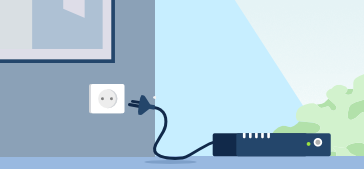
Give the system a few minutes for FaxBridge to communicate to the NetExpress servers. After the SYS light on the unit comes on, your fax machine has an assigned IP address and can receive and send faxes securely over the internet.